

Every licensed fintech is legally required to verify its users before granting full access to accounts. Vban is no different.
KYC (Know Your Customer) is how Vban confirms that your account belongs to you and only you. It protects you from identity theft, fraud, and unauthorised access.
The process takes 10–30 minutes. Once approved, everything unlocks.
What Is KYC?
KYC stands for Know Your Customer. It is the process financial platforms use to verify that you are who you say you are.
It is not a Vban-specific policy. Every fintech company holding a licence is required to comply with the KYC requirements stipulated under relevant Nigerian laws and regulations. The requirement exists to protect users from identity theft, fraud, and unauthorised account access.
When you complete KYC on Vban, you are not just ticking a compliance box. You are locking your account to your identity, so nobody else can access it.
What Does Vban KYC Unlock?
Without KYC, your Vban account has limited functionality. With it, you get full access to everything Vban offers:
- USD, GBP, and EUR accounts: receive international payments in USD, GBP, and EUR from clients and platforms worldwide
- Virtual dollar card: get a virtual dollar card and spend globally on any platform that accepts Visa
- P2P transfers: send and receive money with other Vban users instantly via your Vban Tag
- Stablecoin deposits: receive USDT and USDC directly into your USD wallet.
- Currency conversion: swap to NGN, GHS, XOF, XAF at competitive rates
- Free withdrawals: withdraw to your local bank account at zero cost
What Do You Need to Complete KYC on Vban?
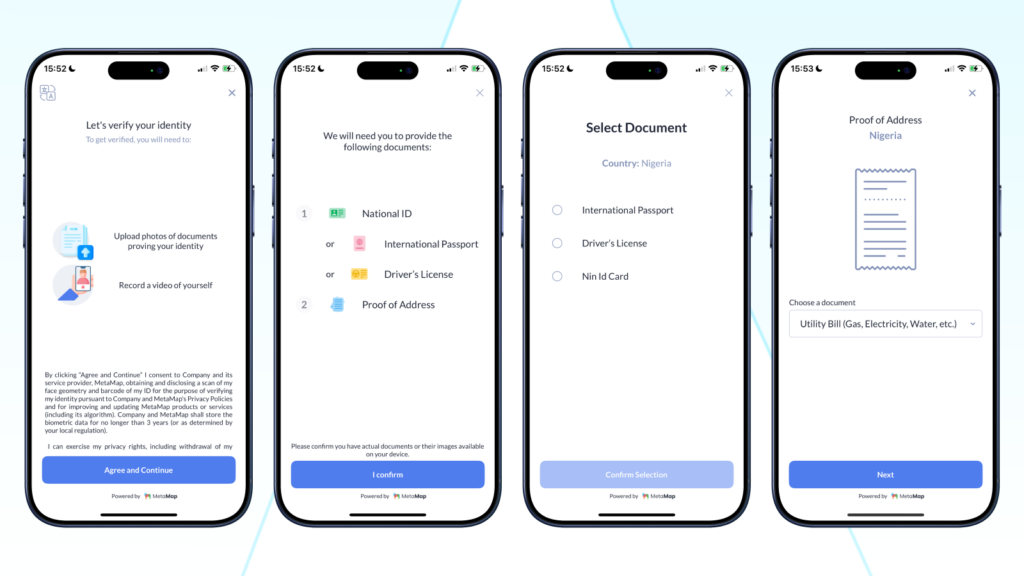
Vban requires one valid government-issued ID. You can use any of the following:
- NIN Card (National Identity Number)
- International Passport
- Driver’s License
You will also need to complete a quick selfie verification to confirm the ID belongs to you.
Make sure your document is valid, clearly photographed, and matches the name on your Vban account before you begin.
How to Complete Your KYC on Vban: Step by Step
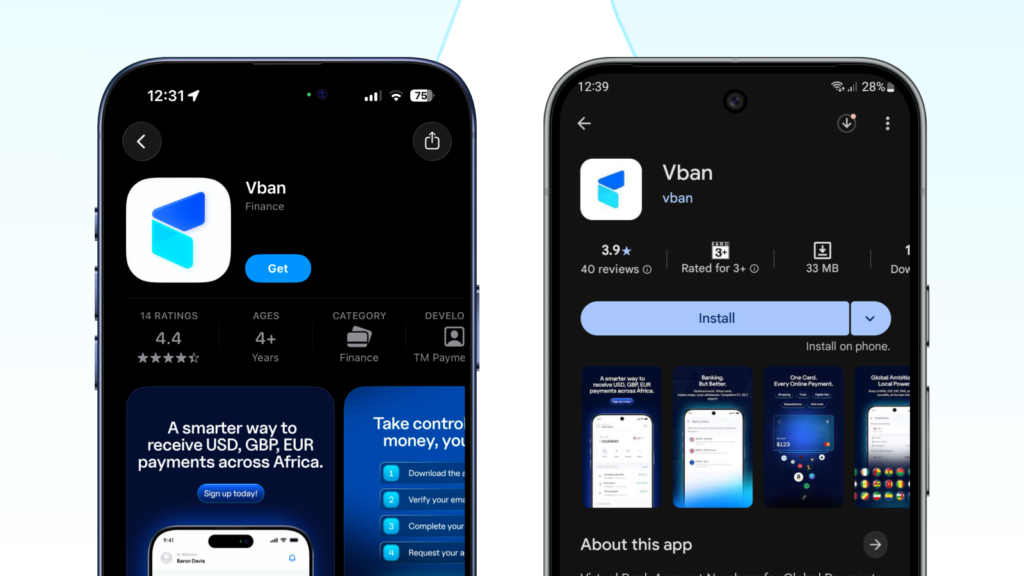
Step 1: Download the Vban app Available on the App Store and Google Playstore. Search “Vban” and install.
Step 2: Create your account, enter your phone number, set a password, and verify your email address.
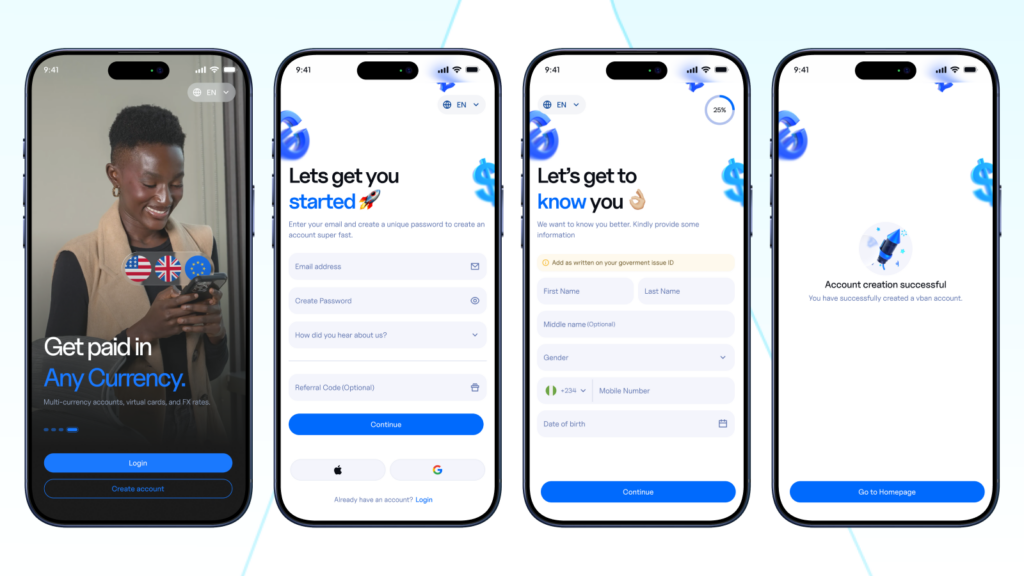
Step 3: Navigate to KYC verification. Once logged in, you will see a prompt to complete your KYC. Tap it to begin. You can also find it under Profile → Verify Identity.
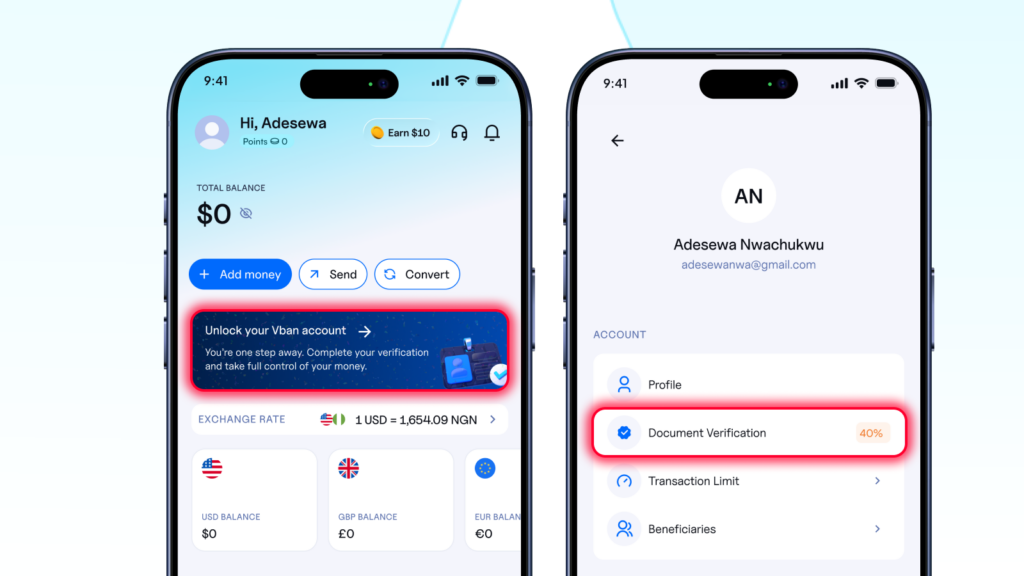
Step 4: Enter your personal details: Fill in your full name, date of birth, and residential address. Ensure these match your ID exactly.
Step 5: Submit your ID. Choose your document type — NIN Card, International Passport, or Driver’s License. Take a clear photo of the front (and back if required). Upload it.
Step 6: Complete your selfie. Vban will ask you to take a live selfie for facial verification. Follow the on-screen instructions. Make sure you are in good lighting.
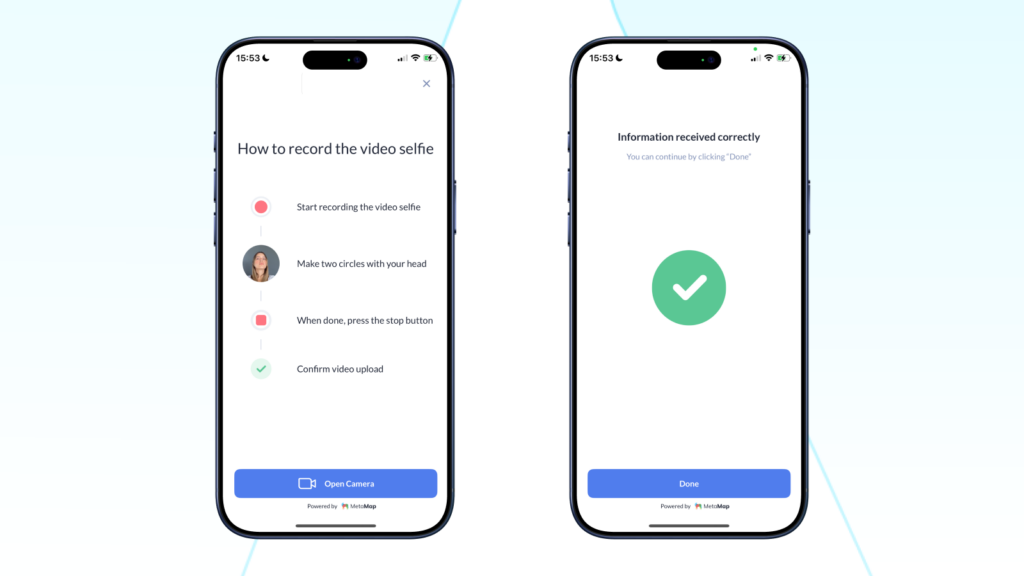
Step 7: Wait for approval. Most KYC verifications on Vban are approved within 10–30 minutes. You will receive an in-app notification and email once your account is verified.
Why Is My KYC Taking Longer Than Expected?
In most cases, KYC is approved within 10 – 30 minutes. Run through these tips before starting your verification to avoid delays:
- Your name matches across all documents: the name on your ID must be identical to the name on your Vban account. For example, if your name is Jane Doe, it should appear as Jane Doe everywhere: no initials, no abbreviations, it should be exactly the same.
- Your document is flat and fully visible: place your ID on a flat surface and make sure all four edges are clearly visible in the frame. Bent or partially cropped documents will be rejected.
- Your photo is sharp and clear: no blurry images. Hold your phone steady or prop it up before taking the shot.
- You are in a well-lit space for your selfie: face a light source. Avoid dark rooms, harsh backlighting, or shadows across your face.
- Remove your glasses before the selfie: glasses can interfere with facial recognition. Take them off before capturing your selfie.
- Your document is valid and not expired: check the expiry date before uploading.
Follow this checklist before submitting to avoid rejection or unnecessary delays. If your verification is still pending after a few hours, our support team is available 24/7 — just tap the chat icon in your Vban app.
Frequently Asked Questions
Is KYC compulsory on Vban?
Yes. KYC is a regulatory requirement for all licensed fintechs. It is mandatory to access full Vban features, including receiving international payments, converting currencies, and withdrawing funds to your local bank account.
Is my personal information safe with Vban?
Yes. Vban is a CBN-licensed fintech operating under Nigeria’s data protection and financial regulations. Your KYC documents are used strictly for identity verification and compliance purposes.
Can I use Vban without completing KYC?
You can create an account, but your access will be limited. To receive payments, convert currencies, and withdraw funds, KYC must be completed.
What if my KYC is rejected?
You will receive a notification with the reason. Common reasons include a blurry document, an expired ID, or a name mismatch. Correct the issue and resubmit. If you need help, contact support via the in-app chat.
How long does Vban KYC take?
Most verifications are completed within 10–30 minutes. In some cases, manual review may take a few hours.
Which ID is best for Vban KYC?
Any valid government-issued ID works: NIN Card, International Passport, or Driver’s License. Use whichever is most readily available and clearly legible.
Does Vban require BVN for KYC?
Vban may request BVN as part of the verification process, depending on your account tier. BVN links your identity to your banking history and helps unlock higher transaction limits.
Complete Your KYC. Unlock Everything.
KYC is the one step that stands between you and the full Vban experience. It takes under 30 minutes, requires one ID, and once it is done, it is done.
- USD, GBP, and EUR accounts.
- Virtual dollar card.
- Free withdrawals.
- P2P transfers.
- Stablecoins.
All of it unlocks the moment your verification is approved. Create your free Vban account today and start receiving payments in USD, GBP, EUR, USDT, and USDC.
Have questions? Contact support@vban.com or connect with @vbanapp on X, Instagram, Tiktok, and LinkedIn.
Last modified: May 26, 2026